Build notes
I Built Pagewright Over the Weekend to Make WordPress Launches Less Fragile
A look at the local control center I built for AI-assisted WordPress pages, controlled deploys, launch QA, tracking, and repeatable site workflows.
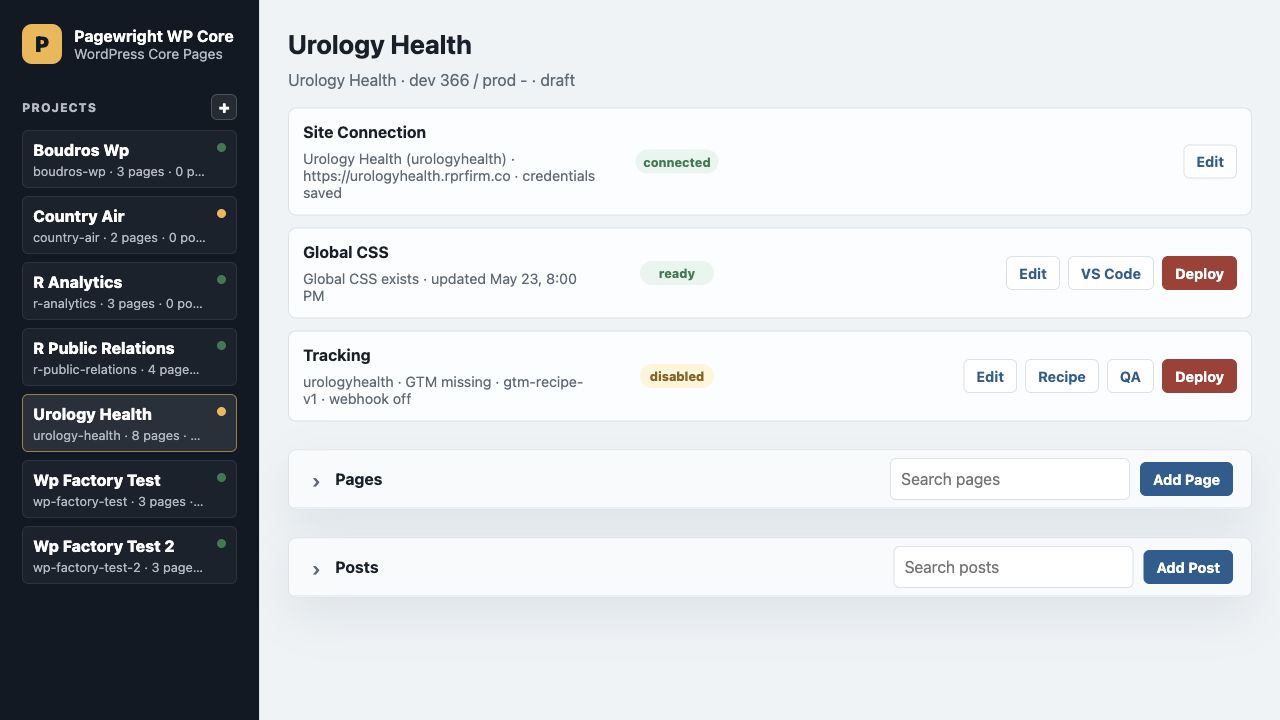
Over the weekend, I built the first working version of Pagewright: a local control center for building, editing, validating, and deploying WordPress pages without turning every update into a manual WordPress admin session.
The idea came from a simple problem. I wanted to use AI to move faster on WordPress builds, but I did not want AI randomly editing a live site, breaking Elementor layouts, or leaving me with a page that only existed inside a browser editor. Pagewright gives me a source-of-truth workflow: pages, posts, site settings, CSS, tracking, and launch checks all live locally first, then deploy into WordPress through a controlled path.

The Core Idea
Pagewright treats WordPress as the renderer, not the workspace.
Each project has local files for pages and posts. Each site has its own dev and production configuration. The Pagewright UI lets me choose a client project, inspect its WordPress connection, edit shared design defaults, configure tracking, and deploy individual pages when they are ready.
That matters because most WordPress workflows are too loose. A page can be half in Elementor, half in custom CSS, half in someone’s browser tab, and half in a Slack thread. Pagewright gives the work a home.
What I Built First
The first version includes the pieces I kept needing on real launches:
- A project dashboard for multiple WordPress sites.
- Page and post management from local source files.
- One-click validation before deploys.
- Controlled pushes to WordPress using page IDs and saved credentials.
- Global CSS controls for project-wide colors and typography.
- Tracking settings for Pagewright events, GTM, GA4, webhooks, Clarity, and Mouseflow.
- QA and recipe generation for launch tracking.
- Guardrails around production and locked environments.

The Global CSS builder was one of the first features that made the tool feel real. Instead of hand-tuning every page from scratch, I can define a project’s colors, typography, buttons, headings, and defaults in one place, preview the system, and push the result when it is ready.
Why This Is Different From Just Using AI in WordPress
AI is useful for writing layouts, copy, CSS, and implementation details. But without a workflow around it, AI can create a mess very quickly.
Pagewright gives AI a boundary:
- The local file is the source of truth.
- HTML gets validated before it moves.
- WordPress receives only the intended block.
- Dev and production are separate.
- Production pushes require explicit intent.
- The launch checklist is part of the system, not a separate note.
That means I can use AI for speed while keeping the boring, important parts controlled.
Tracking Is Built Into the Launch Workflow
I also wanted Pagewright to handle the analytics layer earlier in the process. Tracking is usually the thing people remember after the site is already live. Pagewright puts it beside the page workflow.

The tracking settings are designed around a standard event contract. A Pagewright site can emit events like page views, section views, CTA clicks, form starts, form submits, phone clicks, outbound clicks, and booking clicks. Those events can then be routed through GTM to GA4, ad platforms, CRO tools, and a master webhook.
The goal is simple: when a lead comes in, the site should already know what happened.
Pages, Posts, and Deploys
The page workflow is intentionally practical. Pick a project, open the page list, edit the local page file, validate it, push it, and keep moving.

Pagewright supports both pages and posts because real sites need both. Landing pages, headers, footers, contact pages, and static screens are pages. Long-form articles are posts. Both use the same local editing surface, but deploy through the correct WordPress API path.
What It Can Do Now
Right now, Pagewright can:
- Manage multiple WordPress projects from one local UI.
- Store site profiles, page IDs, post IDs, environment URLs, and deployment defaults.
- Keep secrets out of shared config with a local credentials file.
- Validate managed HTML blocks before they are pushed.
- Push pages and posts to WordPress.
- Pull existing WordPress content back into local files.
- Build and deploy project-wide CSS.
- Configure tracking settings and generate a GTM recipe.
- Run launch QA checks.
- Keep production workflows explicit and harder to trigger accidentally.
- Run as a local web UI, with a Mac wrapper and VS Code extension work already started.
It is not trying to replace WordPress. It is trying to make WordPress launches more repeatable.
What Comes Next
The next layer is provisioning: deeper GTM and GA4 automation, stronger form inventory, webhook routing, and reporting. The foundation is there now. Pagewright already knows the project, the site, the pages, the tracking intent, and the deployment path. The next step is making more of the launch stack executable from that same source of truth.
The best part is that this came together fast because the tool is built for the exact workflow I keep running into. It is not a generic CMS dashboard. It is a launch bench for AI-assisted WordPress work.
That is what I wanted from the weekend build: a system that lets me move faster without making the work more fragile.